Moving warehouse
Count it out. Count it in. Know nothing went missing.
You are moving anyway, and somebody is going to handle every carton twice. If those cartons are scanned on the way out of the old building and on the way into the new one, you get two things for the price of work you had already decided to do.
It is the one week stock can leave without a document naming it.
Every other week of the year, stock leaves your building against something. A sale, a shipment, a credit. Something names it and somebody signs it.
During a move it leaves on a truck, in a hurry, handled by people who do not normally touch it, over several days and sometimes by more than one carrier. If a pallet does not arrive, nobody finds out at the time. They find out in March, when a part that should be there is not — and by then there is nothing left to investigate.
The move itself is the evidence, if anybody writes it down.
Two files you already have.
Your bin locations for each site — the shelves and racks at the old warehouse, and the new one, which can start with a single bin such as RECEIVING — and your parts list, exported from the system you already use. Then scanners, and the people to use them.
It is not a systems project. Nothing is installed on your server and nothing in your accounting system changes. You load two files, count, and read the report.
Eight steps, and the portal keeps the order.
A move has to be done in the right order, by people who are tired and busy. So the direction is set once, before anything is counted, and from then on the portal shows the move as numbered steps — graying out anything that cannot happen yet, and refusing anything out of order.
Check everything is ready
Two sites, bin locations at both, your parts list. The portal answers all five questions before you start, and says what is missing and where to fix it.
Set up the move
Which warehouse is being emptied, and where it is all going. The portal reads it back as the buildings will be — “when this is finished, the old warehouse will be empty” — so the wrong way around is caught before it costs anything.
Count everything out of the old warehouse
Scan the bin, scan the part, say how many — the same as any inventory count. This is an ordinary count, and it is the one that matters.
Count everything into the new one
New site, new bin locations, same scanner. It can start as soon as something has left — it does not wait for the last truck.
Close the count out
When everything has left. The portal shows what it found first — anybody still counting, and any bin nobody scanned, by its code.
Compare the two counts
One button. There is nothing to pick: which way around it goes was settled in step 2.
Read the answer
Part by part, on the same screen that compares a count against your accounts. Recount anything that looks wrong at the new site and compare again.
Finish the move
The figures are shown once more before anything is sealed. Then both counts close, and the reports stay.
The whole job — every question and every refusal — is in the user manual as a flow chart: Moving a warehouse. Its step numbers are the numbers on the screen.
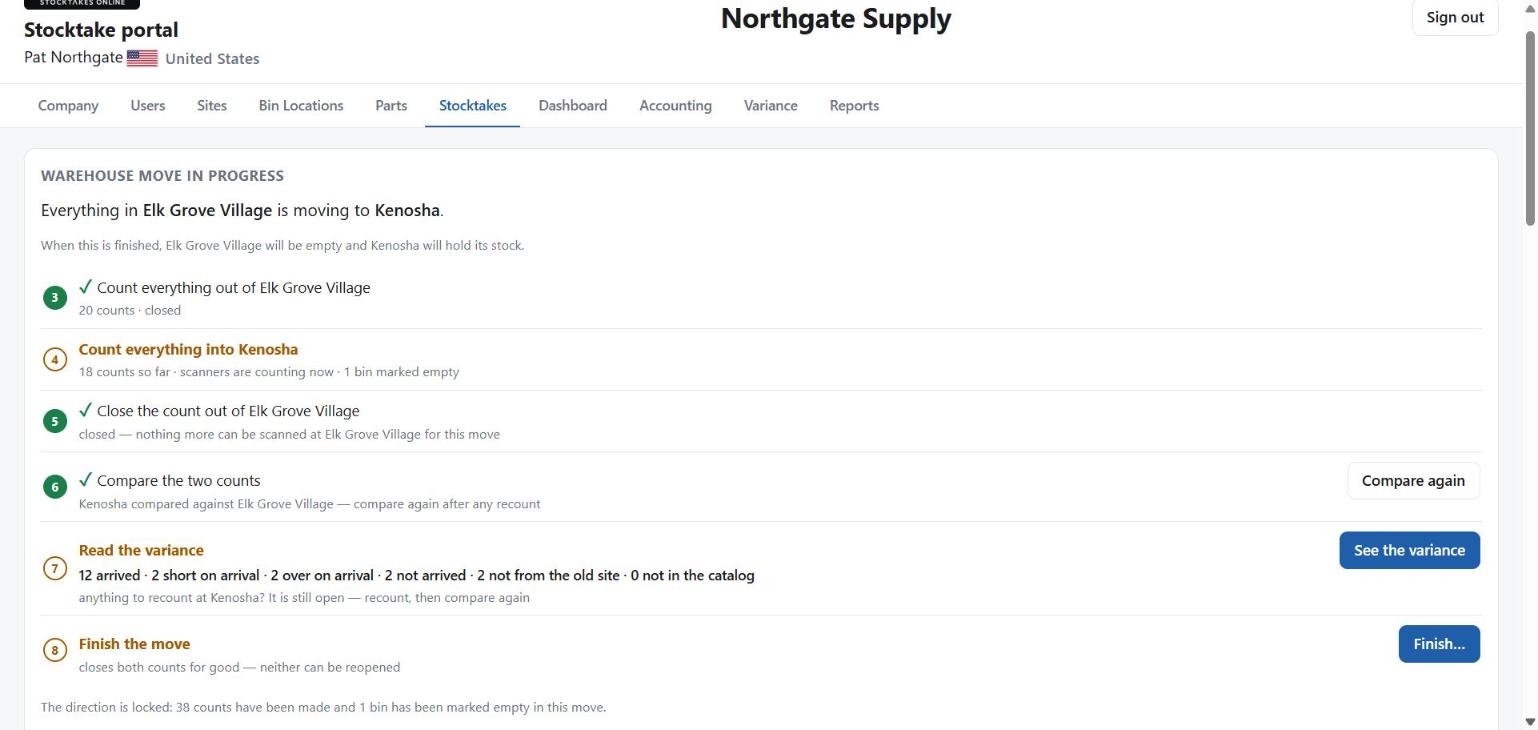
Six answers, in plain English.
Arrived
On the truck, off the truck, numbers agree. This should be nearly all of it.
Short on arrival
Fewer came in than went out. Part of it is still in transit, or it did not make it.
Over on arrival
More came in than went out. Usually stock already at the new site, or a delivery that landed during the move.
Not arrived
Counted out, never counted in.
Not from the old site
Counted in, never counted out.
Not in the catalog
Always zero on a move — both ends scan against the same parts list.
Part number, description, counted out, counted in, and the difference. Printable, exportable to CSV, and it records who ran it and when.
Stock you sold during the move is not missing.
A move takes days. In that week you will sell things, scrap things, and ship things straight to a customer out of the old building. All of it left the old warehouse. None of it is missing.
So before the comparison is made, you hand over a two-column list of everything that left for a reason. It comes off the expected side first.
part number, quantity
NW-08,20
NB-08-40,5
If nothing left except on the truck, leave it out.
And if that list does not add up, the portal refuses it rather than guessing. Name a part that was never counted out, or a bigger quantity than went out, and it stops and tells you which line:
NW-08 — 9999 left the old warehouse but only 500
was counted out of it
Nothing is written when it refuses. A report that calls one real sale a loss is a report you stop believing, and we would rather stop and ask.
It tells you when it is too early to panic.
“Not arrived” on the first morning usually means “still on a truck”. While the new warehouse is still being counted, the report says so at the top, before any figure, so nobody reads a pallet in transit as a loss.
The count in stays open for recounts. Count again anything that looks wrong, compare again, and only when the figures are right do you finish — and the portal shows them to you once more before it seals anything. After that the answer is final.
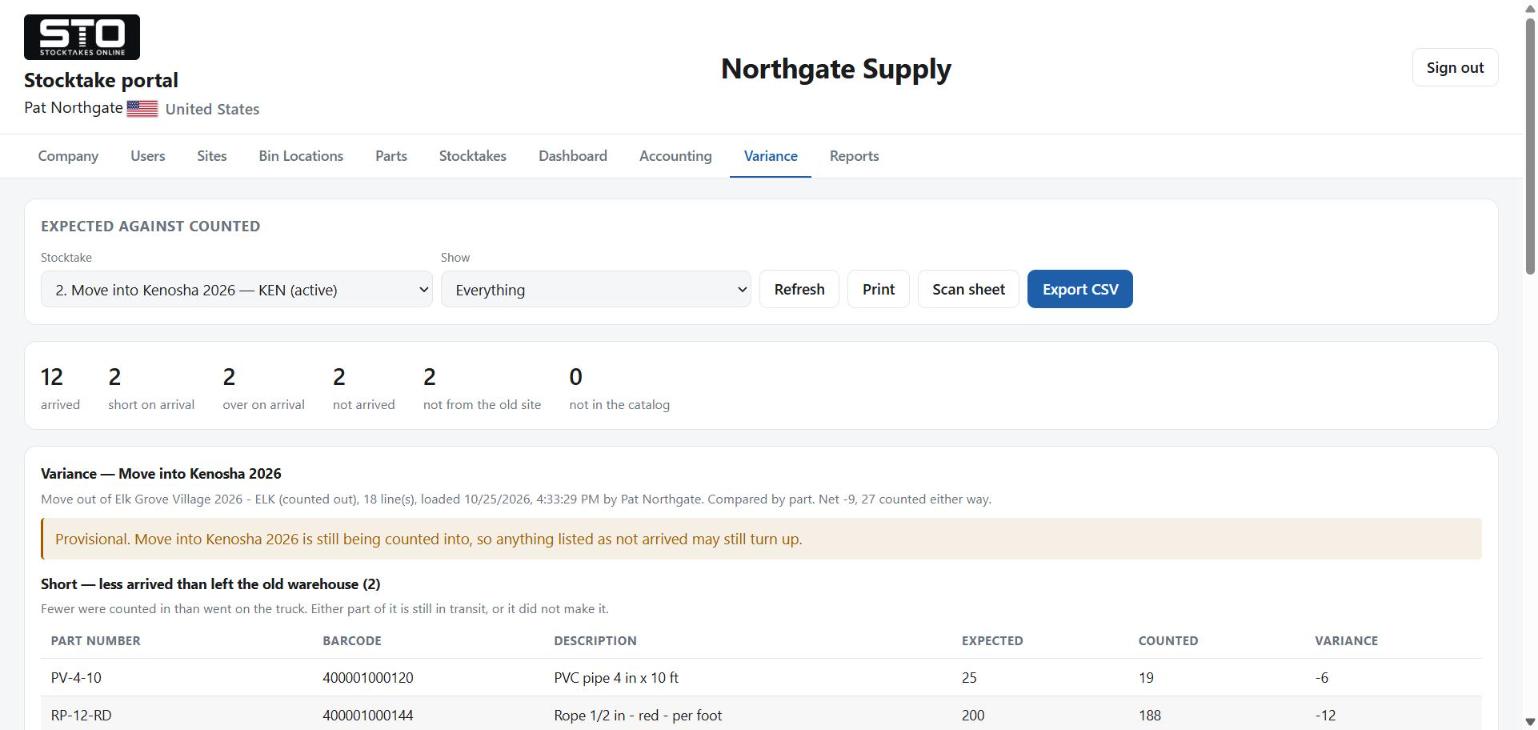
And you get your physical inventory out of it.
The count that empties the old warehouse is an inventory count. Every part, every bin, counted and recorded, by people who are already handling the stock.
Say yes to comparing the old warehouse against your accounts when you set the move up, and you get the ordinary variance as well — what the books said against what was actually on the shelf — on the same count you did to fill the truck. Or do it weeks later: an export loaded against that count compares the old warehouse against your books and never touches the move's own comparison.
Most businesses count because they have to. This one you were going to do anyway. It is two counting events at the usual price, and the comparison itself costs nothing.
No client has run this on a real move yet.
It is built, it is live, and it has been tested end to end on our own demonstration data — every refusal and the whole flow, on real scanners. But you would be the first to use it on an actual move, and you should know that before you rely on it rather than afterwards.
If you are moving and want to try it, call us. We will set it up with you and watch the first count go through.
Moving this year?
Tell us when, and how big, and we will tell you what counting it out would take — scanners, people, and how long the first morning usually runs.